

In past lessons we mentioned “focal length” from a simplistic point of view as the amount of magnification that a lens optical system provides.
Digging a bit deeper, we learn that “Focal length” (FL) is measured in millimeters (mm) and represents the distance between the lens and the focal plane (the recording medium, in our case a digital sensor).
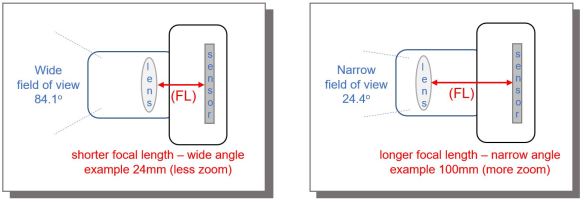
Consider two lenses; one is 24mm (shown on the left) and the other is 100mm (shown on the right). At a focal length of 24mm, considered a wide angle lens, has a wide field of view of 84.1° which has less magnification than the 100mm lens. At a focal length of 100mm, considered a medium telephoto lens, has a much more narrow field of view of 24.4° which has more magnification than the 24mm lens. A subject will appear closer using a 100mm lens verses using a 24mm lens, what we understand as more magnification.
With aperture we learned that “focal length” plays a role in “depth of field”. In the case of “shutter speed” the “focal length” plays a role with both image sharpness and image blur.


The image of the Kingfisher on the left, f/8, 1/800, ISO 400, @ 600mm, notice the body of the bird and tree limb are sharp, while the bird’s beak and portions of the it’s head are not sharp. This is due to the Kingfisher shaking it’s head while the 1/800 of a second shutter speed used to capture the image was too slow to freeze the action. The result is portions of the image, specifically the bird’s head and beak, are blurred. In this case, although somewhat unconventional, the blur in the image conveys more of a story as the blur is conveying motion to the viewer versus the typical static image of the Kingfisher on the right.
Looking closely notice the eye is still pretty sharp, this is due to the pivot point of the bird’s head where there is less motion at the pivot point, the center of the bird’s head, verses more motion at the end of the bird’s beak. This motion is also magnified by the 600mm long focal length used to capture the image.
Both Kingfisher images were taken using a tripod and gimbal head, therefore there was no image blur due to camera movement known as “camera shake” to be discussed in our next lesson.


