What is the Exposure Triangle

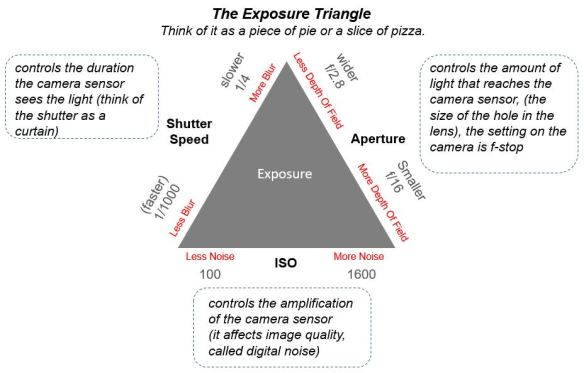
The exposure triangle is an analogy or standard way to explain the result that aperture, shutter speed, and ISO have on exposure. Each setting represents a side of the triangle with the overall size of the triangle representing the exposure (brightness) of the image.

You can think of the triangle as a piece of pie or a slice of pizza, the bigger the slice the brighter the photo. Make the photo brighter or darker by adjusting one or more of the three settings. The setting(s) you choose to change is based on the creative control that we have learned in our past lessons; Creative control with aperture, and “Motion” the creative control behind shutter speed.
©Trevor Awalt_Exposure Triangle

If you slow down the shutter speed, toward 1/4, there is a longer duration for the light to be available to the sensor resulting in a brighter exposure and as a result a larger triangle. Conversely, if you speed up the shutter speed, toward 1/1000, there is a shorter duration resulting in a darker exposure.

By increasing the size of the aperture, toward f/2.8, which allows more light into the camera resulting in a brighter exposure. Conversely, decreasing the size, toward f/16, of the aperture reduces the light into the camera resulting in a darker exposure.

Also, increasing, toward 1600 (more noise), the ISO amplifies the image from the sensor resulting in a brighter exposure. Conversely, if we decrease, toward 100 (less noise), the ISO it decreases the amplification resulting in a darker exposure.

Adjusting any of the three settings; aperture, shutter speed, and/or ISO, requires consideration of the creative control that aperture and shutter speed provide as well as considering the quality of our image with ISO at the same time achieving a proper exposure.

In our next lesson we are going to discuss how the camera measures exposure and how you can help the camera control the exposure in auto and semi-automatic modes.
 

What is Exposure

Exposure in simple terms is the brightness of the over all photograph. The exposure can be controlled completely by the camera, auto mode, or completely by the user, manual mode. In semi-automatic modes the user and the camera work collaboratively to determine the final exposure.

©Trevor Awalt_Incident Light

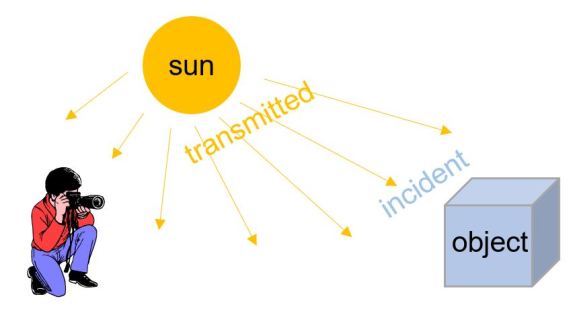
“Incident Light” – Light which is directly falling on a subject

Incident Light” is the light which is directly falling on a subject transmitted from a light source. In this case the diagram shows the light from the sun, transmitted light, falling on, the box object, the photographer, and surrounding area, referred to as incident light. With the photographer in the current position, the camera is not able to measure the incident light falling on the object.

©Trevor Awalt_Reflected Light

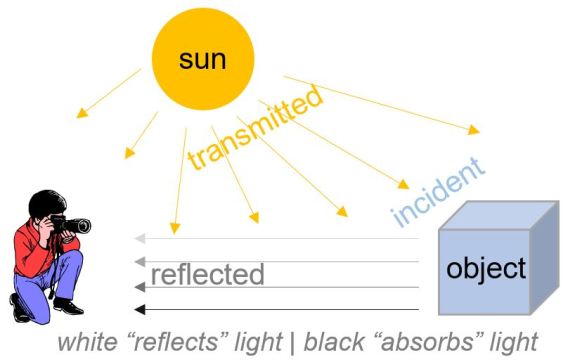
“Reflected Light” – Light which is bouncing off the object and surrounding area

Reflected light” is the light reflected off the object and the surrounding area which originated from the “incident light”. This light enters the camera and based on the aperture, shutter speed, and ISO settings creating the final exposure when you push the shutter button.

©Trevor Awalt_Exposure Meter
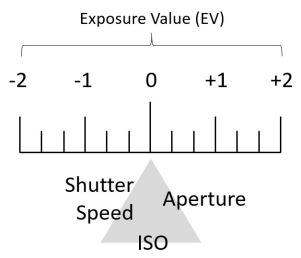
The camera has a built in continuous light meter, seen through the view finder or in live view mode, to help the camera determine what is a good exposure by measuring the “reflected light“. The light meter meter indicator moves, left or right, shown on the meter as it indicates the amount of light the camera sees displaying the result on a scale typically from [ -2 to 0 to +2 ].

So far we have learned aperture, shutter speed, ISO, light, and how the camera measures the light. To put these terms together let’s look at the following teeter-totter/seesaw concept of a balance analogy to help explain the interaction between the aperture, shutter speed and ISO settings.

©Trevor Awalt_Exposure Seesaw

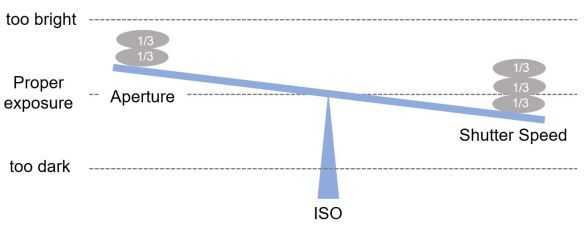
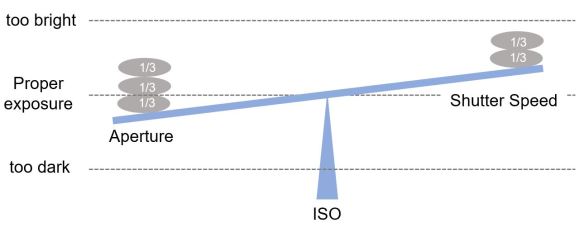
In “manual mode” as we adjust any of the three settings; aperture, shutter speed, or ISO, away from being balanced (proper exposure) by 1/3 stones, the brightness (exposure) of our image will be either brighter or darker depending on the adjustments made.

©Trevor Awalt_Exposure Seesaw_aperture

In the directly above example, if we set the aperture larger, a bigger hole by removing 1/3 stones, the seesaw will move up toward the too bright point. Conversely, if we set a smaller aperture, a smaller hole by adding 1/3 stones, the seesaw will move down toward the too dark point.

©Trevor Awalt_Exposure Seesaw_shutter speed

In the next above example, by setting the shutter speed to a longer duration, by removing 1/3 stones, the seesaw will move up toward the too bright point. Conversely, if we set the shutter speed to a shorter duration , by adding 1/3 stones, the seesaw will move down toward the too dark point.

ISO also plays a role in exposure, if we increase the ISO to a higher value it will push the seesaw toward the too bright point. Conversely, if we decrease the ISO to a lower value it will become closer to the too dark point.

From these examples we can see that there is a balance to maintain between aperture, shutter speed and ISO. If we change aperture we also need to change shutter speed in the opposite direction to maintain the balance (proper exposure). If we adjust ISO we also need to change the aperture or shutter speed settings to maintain a proper exposure.

In our next lesson we will introduce the concept of the exposure triangle which is the most common terminology used to discuss exposure.