July Theme Challenge – “Light”

For this month, July 2019, the theme challenge is “Light”.
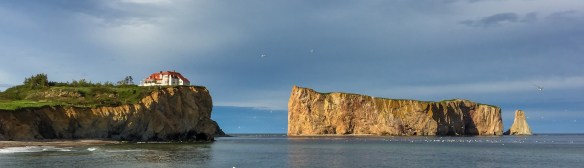
©TrevorAwalt_Perce_IMG_6202

The above image was captured using an iPhone 6 Plus as the sun was setting in the opposite direction causing a golden light to be cast on the landscape, Perce Rock, Quebec, Canada. As you can see it’s more about the light than the gear.

Let’s face it, it’s impossible to even capture an image without light. Light is what we as photographers use to create our images. The quality, direction, angle, colour, and contrast in light is what helps create fantastic images.

There are many opportunities to create amazing images during all kinds of conditions, I encourage you to get out at different times of the day, and under varying weather conditions to witness and capture the light.

Students are encouraged to develop their ability to tell a story or invoke an emotion, as well as how to plan and troubleshoot while creating their images. As such it’s important to not only create the image but to also include a “title”, and write a short paragraph about; how they came up with the idea, any interesting back ground that compelled them to make the image, and describe any techniques on how they overcame any obstacles.

As always with our monthly theme challenges we try to seek out an instructional resource, below is a YouTube video link to give you some hints and ideas.
Nigel Danson, Landscape Photographer instructional aid:
7 Simple ways to “Master Light” in your Photography
Speaker: Nigel Danson
Link: 7 Simple ways to “Master Light” in your Photography (18min 58sec)

An important part of improving your photography is practice, which is one aspect of the monthly theme challenge, in addition you have an opportunity to learn about different genres, techniques and tips.

Camera Colour Space Setting

CIE1931_HumanEyeColourSpectrumColour Space is simply a definition of reproducible colours, typically shown on a graph in relation to the human eye. The four (4) most common colour spaces are; sRGB, Adobe RGB, CMYK, and ProPhoto RGB.

sRGB is the colour space used for images on the internet and for digital displays (monitors) and represents about 50% of the range or colours that the human eye can see. sRGB is the most common (default) colour space used by photo labs for producing prints.

Typically, any camera which only shoot Jpeg images will not have a choice of colour space setting in the camera and defaults to sRGB.

A camera that has the ability to shoot in RAW will typically provide the ability to choose between sRGB or Adobe RGB. As seen in the diagram Adobe RGB covers a wider range of colours than sRGB and covers a range about 75% of what the human eye can see.

It is always best to set the camera to the highest quality colour space setting , Adobe RGB, to maximize the amount of colour information in your captured images. The conversion to sRGB for printing takes place during image exporting using post processing software. It is important to note, if you do not use post processing software the colour space setting should be set to sRGB to allow for proper printing and displaying of your images.

On a Canon T6i the setting, refer to page 146 in the manual,  is located in the camera menu under the second camera tab. Select Color space, then choose Adobe RGB if you use post processing software otherwise choose sRGB.

On a Nikon D5100 the setting, refer to page 10 in the manual. Start by pressing the menu button, then select shooting menu, choose color space and then select Adobe RGB if you use post processing software otherwise choose sRGB.

In our next lesson we will discuss setting the camera’s image resolution.